Welcome to Recog Documentation
Transform physician-patient conversations into structured medical records using AI-powered clinical documentation.
What is Relisten?
Relisten is Recog's flagship API that automates medical note generation by transforming physician-patient conversations into structured clinical documentation. It captures audio, transcribes the conversation, and automatically extracts medical information into structured fields.
What You Receive
- Structured medical records (chief complaint, HPI, physical exam, diagnosis, treatment plan)
- Accurate transcriptions
- Multi-language support (Spanish, English, French, German, and more)
- Fast processing (typically 15-30 seconds per consultation)
Key Benefits
- Time Savings: Reduce documentation time by 20-40%
- Better Patient Care: Physicians focus on patients, not paperwork
- Comprehensive Notes: Capture detailed clinical information automatically
- Physician Satisfaction: Prevent burnout by reducing administrative burden
How It Works
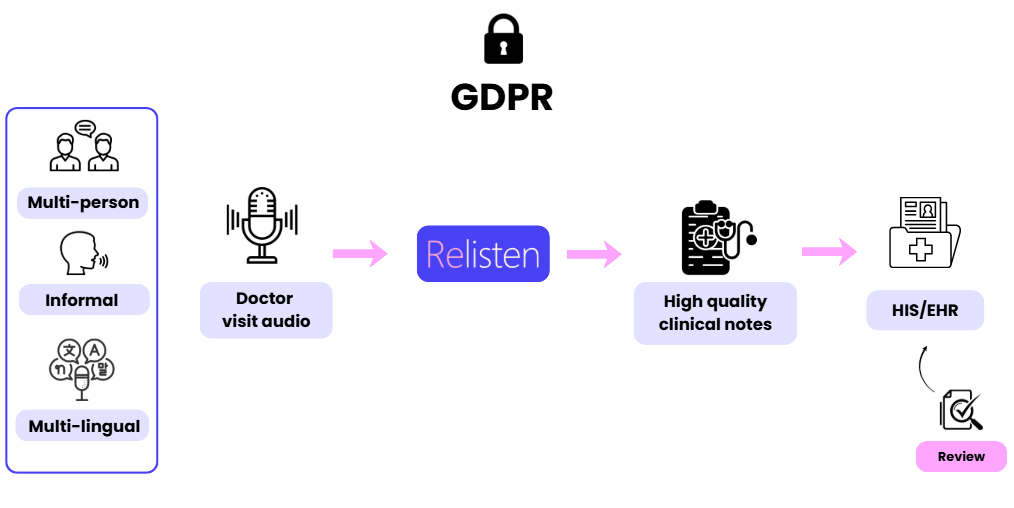
The Relisten Workflow:
-
Start Recording: Physician initiates audio capture from the patient record
-
Consultation: Natural conversation between physician and patient (with pause/resume capability)
-
Upload & Process: Audio is sent to Relisten for AI analysis
-
Retrieve Results: Structured fields appear in the HIS/EHR for physician review
-
Edit & Approve: Physician reviews, corrects, or adds information
-
Save: Approved documentation is stored in your HIS/EHR
Choose Your Integration
Every Relisten integration involves two phases:
- Capture: Recording audio, handling microphone permissions, and submitting the audio to Relisten for processing
- Return: Retrieving the processed results and integrating them into your HIS forms
Different integration options handle these phases differently:
| Integration | Capture | Return | Setup Time |
|---|---|---|---|
| Chrome Extension | Relisten handles it | Relisten handles it | 5 minutes |
| Iframe | Relisten handles it | You build it | 2-3 days |
| API | You build it | You build it | 1-2 weeks |
Chrome Extension (Zero Code)
Both Capture and Return handled by Relisten.
The extension embeds directly into your web-based HIS, handling audio recording and automatically populating form fields with the results. Your team only needs to create a test user in your pre-production HIS environment for us to adapt the extension to your system.
| What You Get | What You Build |
|---|---|
| Recording interface embedded in HIS | Nothing—just provide HIS test access |
| Automatic audio capture and submission | |
| Automatic result retrieval | |
| Automatic form field population |
Best for: Organizations with web-based HIS who want zero development effort
The extension requires specific development for each HIS/EHR system. Check compatibility or request integration.
Credentials: Uses username/password from app.relisten.ai (not OAuth2 client credentials)
Iframe Integration (Quickest Start)
Capture handled by Relisten. Return built by your team.
Embed our pre-built recording interface that handles all audio complexity. Your team implements the result retrieval (callback endpoint or polling) and HIS form integration.
| What You Get (Capture) | What You Build (Return) |
|---|---|
| Recording UI (start/pause/stop) | Callback endpoint or polling logic |
| Microphone handling | Result data integration into HIS |
| Audio encoding and upload | Error handling for failures |
| Browser compatibility |
Best for: Teams who want to skip audio engineering but can build API integrations
Start with Iframe Integration →
API Integration (Full Control)
Both Capture and Return built by your team.
Build a fully custom experience with complete control over the recording UI, audio handling, result retrieval, and HIS integration.
| What You Build (Capture) | What You Build (Return) |
|---|---|
| Recording controls UI | Polling or callback handling |
| Microphone permissions | Result parsing and mapping |
| Audio encoding (MP3/WebM) | HIS form field integration |
| Encounter bootstrap and upload | Error handling and retry logic |
Best for: Teams with audio engineering resources who need custom UI/UX or white-label solutions
Getting Started
1. Get Credentials
Choose based on your integration:
For Chrome Extension:
- Sign up directly at app.relisten.ai (free registration)
- Use your username and password in the extension
For API or Iframe Integration:
- Contact contact@recog.es for OAuth2 credentials
- Receive
client_idandclient_secretfor your organization
2. Authenticate
Chrome Extension: Login with your username/password directly in the floating button interface (uses OAuth 2.1 Authorization Code flow).
API/Iframe Integration: Follow the Authentication Guide to obtain access tokens using:
- Client Credentials grant (server-to-server authentication)
- Authorization Code grant (user authentication in applications)
3. Integrate
Choose your path:
- Chrome Extension - Auto-populate HIS forms (if supported)
- Iframe Integration - Embed recording UI in 5 minutes
- API Integration - Build fully custom UI
API Reference
Complete documentation for all endpoints:
Relisten API
Core API for audio processing and consultation analysis:
- Upload Audio - Send recordings for processing (async or sync)
- Get Results - Retrieve structured medical notes
- Check Status - Monitor processing progress
- Multi-language output - Spanish, English, French, German, Portuguese...
Auth API
OAuth 2.1 authentication and token management:
- Token Generation - Client credentials and authorization code grants
- Authorization Flow - Secure user authentication with PKCE
- User Management - Authentication and authorization
Common Use Cases
Web-Based EMR/HIS Integration
Automatically populate your web-based HIS forms with structured notes, no coding required.
Recommended: Chrome Extension (if HIS is supported) or API Integration
Telehealth Platforms
Add automated note-taking to video consultations or phone calls.
Recommended: Iframe Integration for quick deployment
Desktop-Based EMR/HIS Integration
Integrate Relisten into desktop applications or thick-client EHR systems.
Recommended: API Integration for deep desktop integration
Small Clinics & Individual Practices
Quick, simple documentation solution without complex integrations.
Recommended: Chrome Extension (if HIS is web-based) or use app.relisten.ai directly with copy/paste
Support & Resources
Get Help
- Email: contact@recog.es
- Response Time: usually within the day, but it can take up to 1-2 business days
- Technical Support: Always include your
resultidorclient_id
Documentation
- Authentication Guide - OAuth 2.1 setup
- Iframe Integration - Quick embed guide
- API Integration - Custom implementation
- Relisten API Reference - Complete endpoint documentation
- Auth API Reference - Authentication endpoints
Ready to Start?
Chrome Extension
Capture + Return handled
Zero code. We handle recording and form population for supported HIS.
→ Extension IntegrationIframe Integration
Capture handled, Return you build
We handle recording UI. You build result retrieval and HIS integration.
→ Iframe IntegrationAPI Integration
Capture + Return you build
Full control. Build custom recording UI and result handling.
→ API Integration